Part 1: nmap — why it's everyone's first scan
The tool behind every CTF room and pentest, and where depth and stealth start pulling in opposite directions.
Almost every TryHackMe room, HackTheBox machine, and real-world pentest engagement I’ve been on starts the same way: an nmap scan. Back in 2022, when I was just getting into cybersecurity, I didn’t question it too much and ran nmap because everyone else did.
A couple of months ago, I finally sat down and drew this diagram to answer why.

Made sense when I drew it. Didn't make sense when I found it again. 🙃
Today, when I looked at it again, I realized I’d confused myself. So here we are, I’m re-explaining it, to you and to me.
Before we scan: the basics
Every machine on a network (not just computers, but also printers, security cameras, even hospital IV pumps and robot vacuums) has a unique IP address and up to 65,535 ports.
Think of a gated community. Every community has its own name and several houses inside of the area. Naming the community allows people to easily identify one from the other, which is exactly the purpose of IP addresses in the world of networking.
Our residential area happens to be a massive, 65,535-house community. Just like any other house, each one is addressed by a number, and owners can decide what to do with them.
A few you’ll probably recognize: house 80 runs a web server, house 443 handles secure traffic, house 22 provides remote access. These numbers are what we call port numbers. Not every house is as active or even occupied. Many run quieter services, and some sit completely unused.
What is the main usage of nmap?
With over 60,000 houses in the community, you’d want to know which ones are occupied, what services they run, and whether their doors are open. Checking each one by hand is tedious and impractical.
Nmap is a tool we can use to automate this task. Think of it as someone walking the entire neighborhood and checking each house for us. We can also tell the tool to be noisy (jiggling the doorknob), or to be stealthy (listening for movement) when visiting each house.
When nmap checks a house, it gets one of three responses:
- The door swings open — open port
- The door slams shut — closed port
- You can’t even reach the door, the house is behind an inner wall — filtered
Why is nmap so widely used in offensive security?
I used to wonder if there were better tools or other ways to start an engagement besides doing an nmap scan. Masscan was one tool I explored, and passive recon using Shodan or OSINT are also options I have tried. While experimenting with these, I saw a common thread: reconnaissance.
“Know the enemy and know yourself; in a hundred battles you will never be in peril.” — Sun Tzu, The Art of War
As cliché as it sounds, I cannot think of any other metaphor to best describe the purpose of reconnaissance. In offensive security, building a picture of how the target operates, where the gaps are, and when it’s most exposed is key to making our way in stealthily.
Nmap is a tool almost every security practitioner uses for recon. It is shorthand for Network Mapper. From what I observe, nmap wins over other tools because of two things:
- Versatility — covers a wide array of functionalities on top of port scanning.
- Practicality — allows security engineers to see a comprehensive result in one run.
It’s like choosing a Swiss Army Knife over carrying a dedicated pair of scissors, a standalone corkscrew, and a chef’s knife. Each one is better at its job, but nobody wants to haul all three into the field. Nmap covers enough ground in one run that you’re not constantly switching tools mid-engagement.
Can you get maximum results while staying stealthy?
Circling back to the gated community analogy, if someone were to case the neighborhood, staying as quiet as possible would be the priority, in order to not raise any alarms.
There are many techniques we can use to remain silent. Nmap itself provides a wide range of flags that we can use in combination to achieve stealth. Some of the popular ones include -D, which mixes your real scan with decoy source IPs so defenders can’t easily tell which one is actually you, and -T flags, which let us configure the scan speed.
You can find nmap’s full list of commands online. I personally love this kind of compact nmap cheat sheet: https://cdn.comparitech.com/wp-content/uploads/2019/06/Nmap-Cheat-Sheet.pdf
I tested two Nmap scans with different flags in a controlled lab environment. The first run was a full-port -sS scan, and the second run was an -sV run on specific ports. Both scans were configured to run with source port 53, making the traffic look like DNS replies, which firewalls often let through by default. (More on why and when this works in Part 2.)
The environment was configured with an alert count, allowing me to see exactly how many alerts each nmap scan caused. Here are the key differences.
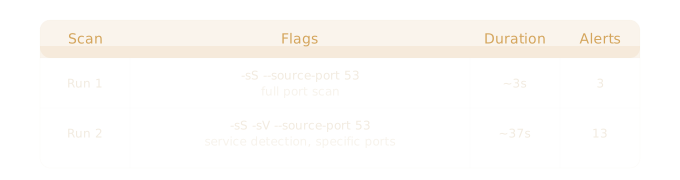
Run 1 was faster and quieter, but it only tells you which ports are open. Run 2 returned richer results, but at the cost of more time and significantly more noise. Through this observation alone, there’s almost always a tradeoff between depth and stealth.
Different flags may cause different noise levels and different results. Choosing our scan configuration carefully is often overlooked, but it matters. Letting the alerts spike draws a SOC analyst’s attention, risking detection before the real work even begins.
Knowing which flags to use is only half the picture. In Part 2, we’ll look at what nmap is actually doing at the wire level: how it discovers hosts, what changes depending on your target’s location in the network, and why running nmap as root fundamentally changes what nmap can do at the packet level.